Overview
After screening your clients, one final step is required if a potential risk is detected.
This detection works through connections to official government-provided lists used for checks.
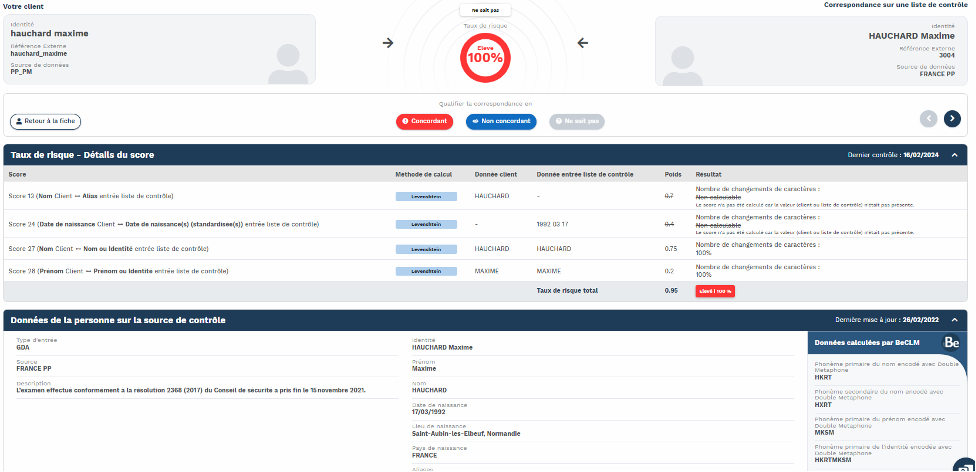
If a match is found between your client’s information and the list data, you must characterise the risk by assigning one of the following 3 statuses:
-
Match
-
No Match
-
Unknown
Quick Navigation
AF/PEP module:
→ Click on the relevant counter
→ Search for the risk folders to be reviewed
→ Characterise the match(es)
Detailed Process
Once your data has been processed, the BeCLM algorithm will highlight any potential risks and create folders for them. These must then be reviewed manually. To do this, go to the AF or PEP module, where all the risk folders are listed.
You will land on the 'Home' tab of the module (the tabs are located on the left-hand side of the page).
This page displays four counters to help you track your pending risk reviews:
• All → Displays all risk folders created in BeCLM, regardless of status.
• To Process → Displays all risks folders that require characterisation.
• Risk ≥ 90% to process → Displays all risk folders, with a risk level equal to or higher than 90%, that require urgent characterisation.
• Status “Unknown” → Displays only folders currently on the “unknown” status.
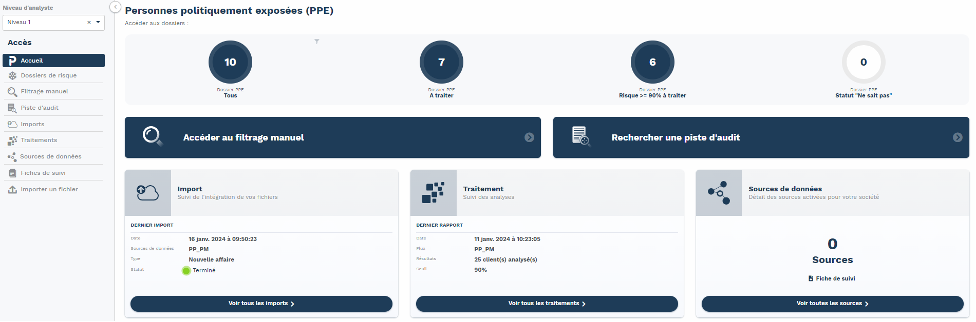
Clicking on one of these counters displays the corresponding risk folders.
You can search using your external reference or scroll down to view the suggested folders.
Click the magnifying glass icon to the right of a file row to view details about your client and the matched data from external lists.
You must now determine whether the flagged risk is valid.
To do so, you have three options:
-
Match: you confirm that the risk applies to your client.
-
No match: the risk is not related to your client.
-
Unknown: You’re unsure if the match is relevant.
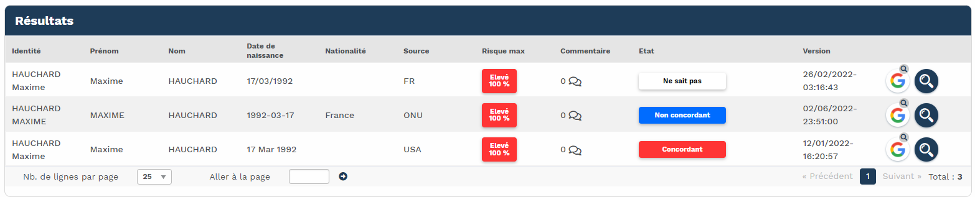
If you're unsure which status to assign, click the magnifying glass to view the match details in full. This will display the data from the corresponding list that triggered the alert, including match scores and explanations of why the risk was flagged for this file.